 By admin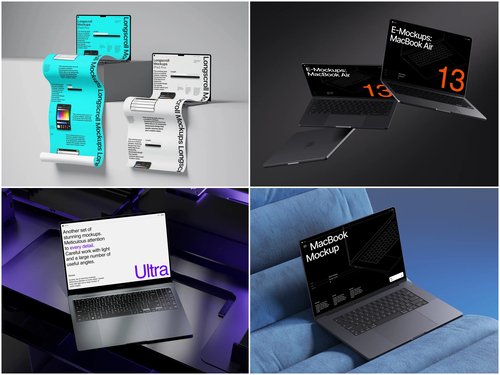
Every designer knows the feeling. You’ve spent hours crafting a pixel-perfect interface, and then someone in the standup says, “I just can’t picture how this would look in real life.” Cue the collective sigh.
The fix isn’t a longer explanation — it’s a better visual. And that’s exactly where a well-placed Laptop mockup becomes your secret weapon in standups and planning sessions.
Why Teams Struggle to Make Decisions in Meetings
Most teams don’t lack ideas — they lack shared context. When a developer, a product manager, and a stakeholder sit in the same room (or the same Zoom call), they’re each picturing something completely different when you say “the dashboard layout.”
Flat wireframes help, but they still require imagination. And imagination, under meeting-room pressure and tight deadlines, is unreliable. People default to gut feeling, personal preference, or whoever speaks loudest. That’s how bad design decisions get greenlit.
The root problem is abstraction. Until someone sees a design as it would actually exist — on a real screen, in a realistic environment — they’re not truly evaluating it. They’re guessing.
What Laptop Mockups Actually Do for Your Workflow
A laptop mockup drops your interface into a photorealistic device frame. Instantly, the design stops being a flat image and starts being a product. This shift is psychological but powerful — people evaluate it differently, more honestly, and more decisively.
In a standup or planning session, this translates to:
- Faster sign-off — stakeholders can visualize the end result without mental gymnastics
- Fewer revision cycles — feedback becomes specific (“the CTA feels too small on this screen”) rather than vague (“something feels off”)
- Aligned expectations — everyone in the room is literally looking at the same thing
It’s the difference between describing a recipe and setting a plate in front of someone.
Real-World Examples: Mockups in Action
SaaS onboarding redesign. A product team was debating two onboarding flows for weeks. The discussion kept going in circles — until the UX lead dropped both flows into laptop mockups side by side in a shared slide. Within ten minutes, the team aligned on option B. The realistic context made the UX differences immediately legible.
Agency client presentation. A digital agency was pitching a new e-commerce dashboard to a non-technical client. Instead of showing Figma files, they embedded the screens into sleek laptop mockups with a clean desk background. The client approved the direction in the first meeting — no revision requested.
Sprint planning prioritization. A development team used laptop mockups during backlog grooming to visually compare what features would look like at different stages of completion. It helped the PM argue convincingly for prioritizing a feature that looked underwhelming in wireframe but impressive in context.
Remote team standup. A fully distributed team started dropping a daily “mockup of the day” into their async standup update — a single realistic screen showing what had been built or designed. It replaced three paragraphs of description with one glance.
Laptop Mockups on ls.graphics
ls.graphics offers a premium library of laptop mockups built for professionals who care about quality. Every scene features ultra-realistic rendering that makes your designs indistinguishable from a real photograph.
What sets them apart: meticulously organized layers for easy customization, a wide variety of angles (front, side, perspective, aerial), multiple color styles to match any brand, and stylish minimalistic compositions that keep focus on your design — not the frame. The Edit Online feature lets you apply your screens without opening any software. And with a generous collection of free scenes available, there’s no reason not to try before you commit.
How to Integrate Mockups Into Your Meeting Culture
You don’t need a new process — just a new habit. Here’s a simple way to start:
- Before every standup, drop your latest design into a mockup and share it in Slack or your meeting doc
- During planning, use side-by-side mockups to compare feature directions visually
- In retrospectives, use mockups to document what shipped — it’s more engaging than a changelog
- When onboarding new team members, use mockups from past sprints to visually walk them through the product evolution — it’s faster than reading tickets and infinitely more memorable
- Before client calls, prepare one hero mockup that represents the current state of the project — it sets a confident, professional tone before a single word is spoken
Small habits compound. Once your team gets used to seeing designs in realistic context, mockups don’t just improve how you present work — they raise the entire team’s visual standard and make every decision more grounded.
Conclusion
Great meetings run on shared understanding, and shared understanding runs on great visuals. Laptop mockups bridge the gap between raw design files and real human decisions — making standups sharper, planning sessions shorter, and stakeholder alignment actually achievable.
If you’re ready to make that shift, ls.graphics is one of the best places to start. Premium quality, zero friction, and results your whole team can see — literally.